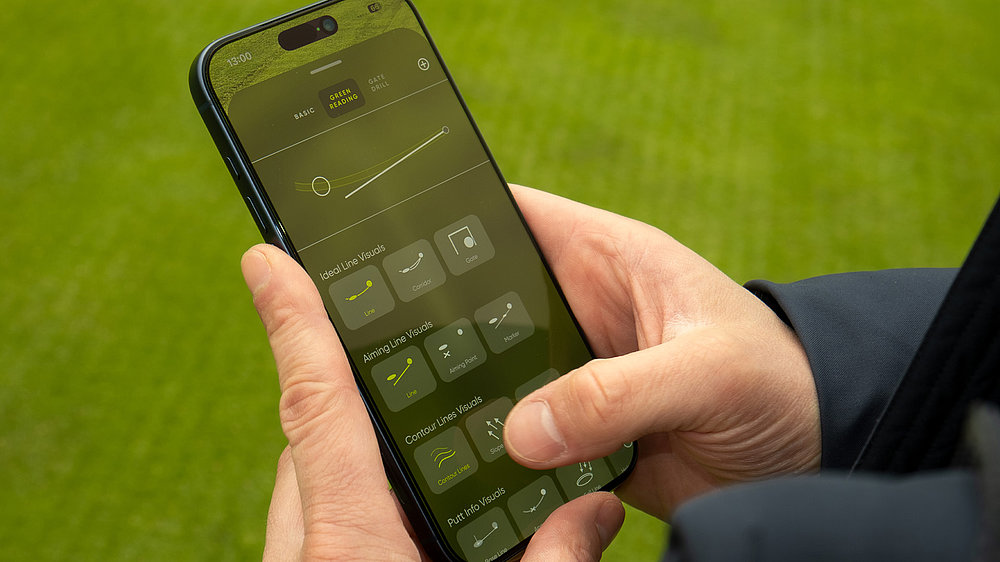
Not all visuals suit every player or purpose. PuttView offers different line styles, aiming and informative visuals, animations, and more, - each gives you a different way of reading the same putt. Try them out and save your favorite as the default.
How to build a visual set?‘
To edit an existing visual set, long-press on the respective set or swipe up and access the customization menu. Tap on any visual you like to access the detailed visual menu where you can change colors, appearance, density, and more. You can get a live preview of your changes in the preview window above. To add a new custom set, tap the “plus” sign in the top right corner. Another tap on the preset name opens your keyboard, so you can rename your set.
Some inspiration for visual sets:
Straight Line Thinker: a clean, direct line from ball to the aiming point – so-called Aiming Line. Best for players who like a simple aim point and focus on the straight line.
Curved Line Thinker: the line the ball follows to hit the exact middle of the cup at your intended power – called Ideal Line. Best for players who like to visualize the break while standing over a putt.
Contour Lines: a visual representation of the terrain, connecting points of equal elevation. Best for feel players, visualizing the slope of the green while standing over a putt.
The Presets
The basic version of the app features two presets – Ideal Line and Aiming Line. Both presets have Contour Lines in the background, so all three core visuals are accessible for all users, regardless of subscription level. The “Pro” level unlocks five additional presets next to the full suite of customization options:
Aim Guide: Aiming Line, Aiming Corridor, Slope Arrows, Slope Percentage – the best set to visualize how your start line with more or less power
Speed Line: Ideal Line, Rolling Balls, Aiming Line – the best set to visualize and develop a feel for speed
Gate Trainer: Gate, Aiming Line, Aiming Point – the best set to create different gate drills on the green
Pro Read: Ideal Line, Aiming Marker, Contour Lines – the best set for simple green reading
Green Map: Contour Lines, Slope Arrows, Slope Percentage – the best set for practice rounds